Rental - DeFelsko 200B1-E PosiTector 200 B1 Standard Coating Thickness Gage

Model: 200B1-E-RENTAL

Rental - DeFelsko 200B1-E PosiTector 200 B1 Standard Coating Thickness Gage

Model: 200B1-E-RENTAL

Featuring a gage that non-destructively measures polymer coating on wood, plastic, and such using proven ultrasound technology. Gage body allows any PosiTector probe to be attached.

Featuring a gage that non-destructively measures polymer coating on wood, plastic, and such using proven ultrasound technology. Gage body allows any PosiTector probe to be attached.

Duration   day(s)
Your Price
15.00 USD
Quantity

DeFelsko 200B3 PosiTector Offers

Features

Simple

  • Ready to measure - no adjustment required to measure most coatings
  • Large 2.8" impact resistant color touchscreen with keypad for quick menu navigation
  • On-gauge help explains menu items at the touch of a button
  • Reset feature instantly restores factory settings

Accurate

  • Responsive transducers provide fast, accurate readings
  • Proven non-destructive ultrasonic technique
  • Conforms to ASTM D6132 and ISO 2808

Powerful

  • Statistics mode continually displays/updates average, standard deviation, min/max thickness and number of readings while measuring
  • Screen capture - save 100 screen images for record keeping and review
  • Max Thick Mode displays the deepest ultrasonic echo eliminating the need to adjust the Lo range - ideal for ignoring unwanted surface echoes
  • USB port for fast, simple connection to a PC and to supply continuous power, USB cable included
  • PosiSoft USB Drive - stored readings and graphs can be accessed using universal PC/Mac web browsers or file explorers, no software required
  • Screen Capture – save 100 screen images for record keeping and review
  • Storage of 1000 readings per probe - stored readings can be viewed or downloaded

Durable

  • Weatherproof, dust-proof, and water-resistant - IP65-rated enclosure
  • Ergonomic design with durable rubberized grip
  • Shock-absorbing protective rubber holster for added impact resistance

Versatile

  • PosiTector body accepts all PosiTector 200, 6000, DPM, IRT, RTR, SPG, SST, SHD, BHI, and UTG probes easily converting from a coating thickness gauge to a dew point meter, surface profile gauge, soluble salt tester, hardness tester, or ultrasonic wall thickness gauge
  • Multiple calibration adjustment options including zero, 1 point, 2 point, and ISO 19840 correction factors
  • Mils/Microns switchable
  • Selectable display languages
  • Auto rotating display with flip lock

Includes all of these, PLUS:

  • Storage of 250,000 readings from multiple probes in up to 1000 batches and sub - batches
  • Live graphing of measurement data
  • Touchscreen keyboard for quickly renaming batches, adding notes, and more
  • WiFi technology wirelessly synchronizes with PosiSoft.net and downloads software updates
  • Bluetooth 4.0 Technology for data transfer to a mobile device running the PosiTector App or optional portable printer. BLE API available for integration into third-party software
  • Integrate with third-party software, drones, ROVs, PLCs, and robotic devices using several industry-standard communication protocols

Applications

  • Polymer coatings on woods and plastics

USB keyboard mode

USB Keyboard mode enables PosiTector Advanced instruments to emulate a USB keyboard when connected to a computer.

USB Keyboard mode communicates with your computer by emulating keyboard keystrokes. When connected in this mode, PosiTector Advanced instruments will be recognized as a simple USB keyboard. Each reading is ‘typed’, followed by a carriage return (enter). This provides a simple way to capture readings as they are taken without any special software, drivers or complex setup.

WiFi streaming

Built into the PosiTector Advanced gauge is the ability to stream readings over WiFi. If WiFi Streaming is enabled in the WiFi menu, the gauge will send a GET request to specified URL for each reading. The URL can contain tags which are replaced by the PosiTector with values corresponding to the reading. This solution turns the PosiTector gauge body into an Internet of Things device and is ideal for users with an existing WiFi network and a desire to stream live readings to a central application or database.

How to use WiFi Streaming

  1. Connect the PosiTector to a WiFi network
  2. Navigate to http://<positector ip address="">:8080/stream_url.php on a device connected to the </positector>same network. Replace <positector ip address=""> with the IP of the PosiTector found in the Connect menu. This page contains a text area where a URL can be entered as well as instructions on how to format the URL and what optional tags are available.</positector>
  3. As readings are taken the gauge will send GET requests to the URL entered.

USB serial streaming

PosiTector Advanced allows live streaming of measurement values to a USB connected computer.

Any software that accepts data via a serial interface can be configured to accept the PosiTector data stream.

The PosiTector creates a virtual ‘serial’ port, a protocol commonly used by applications to communicate with external tools and devices. PosiTector measurements can be captured as they are taken in real-time, including metadata such as the units and measurement type.

Any serial-compatible software can be configured to accept the PosiTector data stream. Proficient (by InfinityQS) and WinSPC (by DataNet systems) are two popular statistical process control (SPC) software options.

This solution is ideal for users who want the reliability and simplicity of a wired connection.
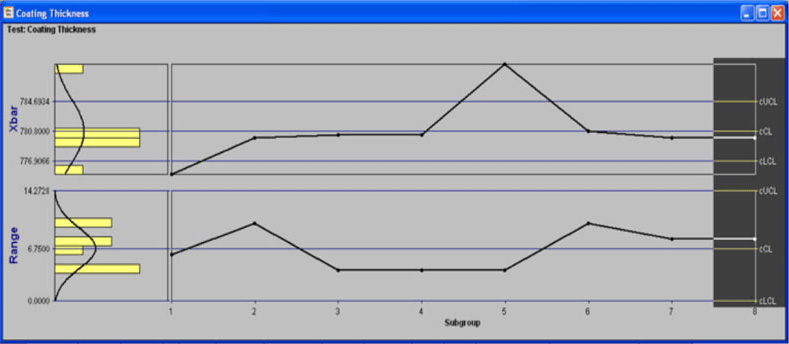
measurement data being streamed to a computer and processed using Proficient (by InfinityQS)

Proficient

measurement data being streamed to a computer and processed using WinSPC (by DataNet systems)

WinSPC

WiFi server mode

WiFi wireless technology is included with all PosiTector Advanced models Automatic Adhesion Testers with touchscreen display.

Any device connected on the same WiFi network can wirelessly access the gauge's stored measurement data to:

  • Viewed stored measurements using a standard web browser
  • Access HTML, comma delimited text (.txt) and JSON schema files - parse information for inclusion in databases or custom software applications
  • Remotely control gauge memory features such as creating a new batch, closing a batch and deleting all measurement data
  • Remotely view the live display of a working instrument - see the gauge display as if it were in your hand

This solution is ideal for users who want to store readings in the PosiTector gauge body to be transferred to another device at a later date.

Download the App

DeFelsko 200B1-E-RENTAL Specifications

Measurement Range 13 to 1000 µm (0.5 to 40 mils)
Accuracy ±(2 μm + 3% of reading)
±(0.1 mil + 3% of reading)
Minimum Individual Layer Thickness 13 to 1000 µm (0.5 to 40 mils)
Certified Thickness Standard STDA3
Dimensions 5.25 x 2.4 x 1.1" (135 x 61 x 28 mm)
Weight 4.9 oz (140 g)
Click here for complete specifications on the DeFelsko 200B1-E-RENTAL

What's included with the DeFelsko 200B1-E-RENTAL

  • Standard PosiTector Gauge Body
  • Long Form Certificate of Calibration Traceable to NIST
  • 200B Probe
  • Couplant (Ultrasonic Gel)
  • Precision Plastic Shims
  • Protective Rubber Holster
  • Protective Lens Shield
  • USB Cable
  • Wrist Strap
  • Carrying Case
  • 3 x AAA Alkaline Batteries
  • Instructions
  • PosiSoft Software
  • Two-Year Warranty

PosiSoft Software Solutions

Generate custom, professional PDF reports

  • Include inspection information such as on-site pictures, screen captures, notes and more to communicate important details
  • Create and save multiple custom layouts as templates - insert cover pages, add logos/images, and select font and point size
  • Select the information to include for each product type - charts, histograms, readings, time stamps and more
  • Compile multi-batch reports from one or more instrument types
  • Batch comparison chart - compare multiple batches (same instrument type) on a single chart
PosiSoft Software is available for multiple platforms
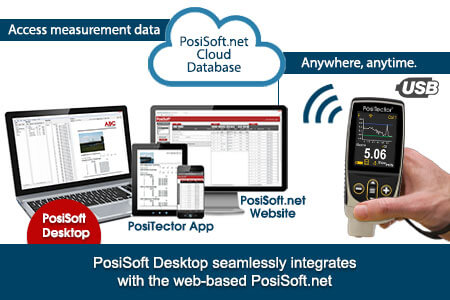
PosiSoft Desktop seamlessly integrates with the web-based PosiSoft.net

Integration with PosiSoft.net

Batches uploaded to PosiSoft.net via WiFi or USB will be downloaded automatically to PosiSoft Desktop. A gauge can be registered to multiple instances of PosiSoft Desktop - a simple way to share measurement data with colleagues and clients. Alternatively, use the PosiSoft.net website to view your measurement data from any web enabled device.

PosiSoft Desktop

Powerful desktop software for downloading, viewing, printing and storing measurement data. No internet connection required.

  • Simple, intuitive user interface
  • Import readings directly from the gauge via USB or from legacy PosiSoft desktop versions
  • Synchronize measurement data including readings, notes and pictures to and from PosiSoft.net

Features

  • Jobs feature consolidates batches into groups to keep measurement data organized and to quickly create multi-batch reports
  • Report preview automatically refreshes as changes are made
  • Import/Export all measurements data including jobs, report templates and settings for backup and sharing
  • Save readings as comma separated value (.CSV) files which can easily be imported into supporting applications such as documents, spreadsheets and databases.
  • Import PDF documents as batches - Ideal for including measurement data from unsupported or non-digital instruments
  • Convenient graphs allow you to spot climatic trends and cycles quickly
  • Displays min/max readings for all parameters with date and time stamp
  • Integrated PosiSoft Desktop Manager (PDM) functionality. PC and Mac users can now update their gauge and synchronize with PosiSoft.net when connected via USB while PosiSoft Desktop is running
  • Multi-language support - English, Spanish, German, French, Chinese and Korean

PosiSoft.net

PosiSoft.net is a web-based application offering secure centralized management of PosiTector and PosiTest AT-A readings. Synchronize measurement data from your instrument and access it from anywhere in the world.

Features

  • Simple, intuitive user interface
  • Synchronize measurement data from your instrument to PosiSoft.net
  • Synchronize measurement data including readings, notes and pictures with PosiSoft Desktop and PosiTector App
  • Access your data from any web-connected device
  • Securely store measurement data in the cloud and share with authorized users
PosiSoft.net's simple interface displays your jobs, batches and readings

PosiSoft USB

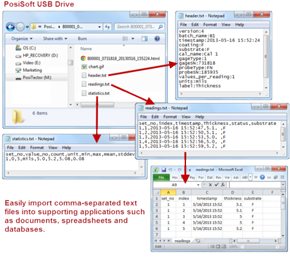
All PosiTector instruments feature a built-in PosiSoft USB Drive which provides a simple interface to retrieve data in a manner similar to USB flash drives, cameras, or digital audio players.
Simple gauge interface to retrieve data in a manner similar to USB flash drives, cameras, or digital audio players. No software to install or internet connection required.
Any computer can view and download measurements (batches) stored in memory by navigating a virtual drive labeled "PosiTector" using the included USB cable.

Features

  • View and print readings and graphs using universal PC/Mac web browsers or file explorers
  • Formatted HTML report - Sample Report
  • Measurement data is stored in comma-separated text files which can easily be imported into supporting applications such as spreadsheets and databases
  • Simple file management - Copy and paste measurement data from the PosiTector to a local folder on your computer, network folder or a cloud drive
  • Access stored screen captures (snapshots) of the PosiTector display
simple interface to retrieve data like USB flash drives
easily import comma-separated text files into supporting applications

Comma separated text files
Measurement data is stored in comma-separated text files (.txt) which can easily be imported into supporting applications such as spreadsheets and databases. The text files are automatically generated and are available by simply plugging in the USB cable to any computer (Mac/PC/Unix).

Easily move files from the PosiTector USB Drive to your Local Folder

Simple file management
Copy and paste measurement data from the PosiTector to a local folder on your computer, network folder or a cloud drive.

Find stored screen captures easily in the screen_capture folder

Access stored screen captures
PosiTector users can capture and save an image copy of the current gauge display by simultaneously pressing both the (-) and (+) buttons. The last 10 screen captures are stored in memory and can be accessed within the PosiSoft USB Drive.

Ask a question about Rental - DeFelsko 200B1-E PosiTector 200 B1 Standard Coating Thickness Gage

Customer Reviews for the DeFelsko 200B1-E-RENTAL

DeFelsko 200B3 PosiTector Offers

Features

Simple

  • Ready to measure - no adjustment required to measure most coatings
  • Large 2.8" impact resistant color touchscreen with keypad for quick menu navigation
  • On-gauge help explains menu items at the touch of a button
  • Reset feature instantly restores factory settings

Accurate

  • Responsive transducers provide fast, accurate readings
  • Proven non-destructive ultrasonic technique
  • Conforms to ASTM D6132 and ISO 2808

Powerful

  • Statistics mode continually displays/updates average, standard deviation, min/max thickness and number of readings while measuring
  • Screen capture - save 100 screen images for record keeping and review
  • Max Thick Mode displays the deepest ultrasonic echo eliminating the need to adjust the Lo range - ideal for ignoring unwanted surface echoes
  • USB port for fast, simple connection to a PC and to supply continuous power, USB cable included
  • PosiSoft USB Drive - stored readings and graphs can be accessed using universal PC/Mac web browsers or file explorers, no software required
  • Screen Capture – save 100 screen images for record keeping and review
  • Storage of 1000 readings per probe - stored readings can be viewed or downloaded

Durable

  • Weatherproof, dust-proof, and water-resistant - IP65-rated enclosure
  • Ergonomic design with durable rubberized grip
  • Shock-absorbing protective rubber holster for added impact resistance

Versatile

  • PosiTector body accepts all PosiTector 200, 6000, DPM, IRT, RTR, SPG, SST, SHD, BHI, and UTG probes easily converting from a coating thickness gauge to a dew point meter, surface profile gauge, soluble salt tester, hardness tester, or ultrasonic wall thickness gauge
  • Multiple calibration adjustment options including zero, 1 point, 2 point, and ISO 19840 correction factors
  • Mils/Microns switchable
  • Selectable display languages
  • Auto rotating display with flip lock

Includes all of these, PLUS:

  • Storage of 250,000 readings from multiple probes in up to 1000 batches and sub - batches
  • Live graphing of measurement data
  • Touchscreen keyboard for quickly renaming batches, adding notes, and more
  • WiFi technology wirelessly synchronizes with PosiSoft.net and downloads software updates
  • Bluetooth 4.0 Technology for data transfer to a mobile device running the PosiTector App or optional portable printer. BLE API available for integration into third-party software
  • Integrate with third-party software, drones, ROVs, PLCs, and robotic devices using several industry-standard communication protocols

Applications

  • Polymer coatings on woods and plastics

USB keyboard mode

USB Keyboard mode enables PosiTector Advanced instruments to emulate a USB keyboard when connected to a computer.

USB Keyboard mode communicates with your computer by emulating keyboard keystrokes. When connected in this mode, PosiTector Advanced instruments will be recognized as a simple USB keyboard. Each reading is ‘typed’, followed by a carriage return (enter). This provides a simple way to capture readings as they are taken without any special software, drivers or complex setup.

WiFi streaming

Built into the PosiTector Advanced gauge is the ability to stream readings over WiFi. If WiFi Streaming is enabled in the WiFi menu, the gauge will send a GET request to specified URL for each reading. The URL can contain tags which are replaced by the PosiTector with values corresponding to the reading. This solution turns the PosiTector gauge body into an Internet of Things device and is ideal for users with an existing WiFi network and a desire to stream live readings to a central application or database.

How to use WiFi Streaming

  1. Connect the PosiTector to a WiFi network
  2. Navigate to http://<positector ip address="">:8080/stream_url.php on a device connected to the </positector>same network. Replace <positector ip address=""> with the IP of the PosiTector found in the Connect menu. This page contains a text area where a URL can be entered as well as instructions on how to format the URL and what optional tags are available.</positector>
  3. As readings are taken the gauge will send GET requests to the URL entered.

USB serial streaming

PosiTector Advanced allows live streaming of measurement values to a USB connected computer.

Any software that accepts data via a serial interface can be configured to accept the PosiTector data stream.

The PosiTector creates a virtual ‘serial’ port, a protocol commonly used by applications to communicate with external tools and devices. PosiTector measurements can be captured as they are taken in real-time, including metadata such as the units and measurement type.

Any serial-compatible software can be configured to accept the PosiTector data stream. Proficient (by InfinityQS) and WinSPC (by DataNet systems) are two popular statistical process control (SPC) software options.

This solution is ideal for users who want the reliability and simplicity of a wired connection.

measurement data being streamed to a computer and processed using Proficient (by InfinityQS)

Proficient

measurement data being streamed to a computer and processed using WinSPC (by DataNet systems)

WinSPC

WiFi server mode

WiFi wireless technology is included with all PosiTector Advanced models Automatic Adhesion Testers with touchscreen display.

Any device connected on the same WiFi network can wirelessly access the gauge's stored measurement data to:

  • Viewed stored measurements using a standard web browser
  • Access HTML, comma delimited text (.txt) and JSON schema files - parse information for inclusion in databases or custom software applications
  • Remotely control gauge memory features such as creating a new batch, closing a batch and deleting all measurement data
  • Remotely view the live display of a working instrument - see the gauge display as if it were in your hand

This solution is ideal for users who want to store readings in the PosiTector gauge body to be transferred to another device at a later date.

Download the App

DeFelsko 200B1-E-RENTAL Specifications

Measurement Range 13 to 1000 µm (0.5 to 40 mils)
Accuracy ±(2 μm + 3% of reading)
±(0.1 mil + 3% of reading)
Minimum Individual Layer Thickness 13 to 1000 µm (0.5 to 40 mils)
Certified Thickness Standard STDA3
Dimensions 5.25 x 2.4 x 1.1" (135 x 61 x 28 mm)
Weight 4.9 oz (140 g)
Click here for complete specifications on the DeFelsko 200B1-E-RENTAL

What's included with the DeFelsko 200B1-E-RENTAL

  • Standard PosiTector Gauge Body
  • Long Form Certificate of Calibration Traceable to NIST
  • 200B Probe
  • Couplant (Ultrasonic Gel)
  • Precision Plastic Shims
  • Protective Rubber Holster
  • Protective Lens Shield
  • USB Cable
  • Wrist Strap
  • Carrying Case
  • 3 x AAA Alkaline Batteries
  • Instructions
  • PosiSoft Software
  • Two-Year Warranty

PosiSoft Software Solutions

Generate custom, professional PDF reports

  • Include inspection information such as on-site pictures, screen captures, notes and more to communicate important details
  • Create and save multiple custom layouts as templates - insert cover pages, add logos/images, and select font and point size
  • Select the information to include for each product type - charts, histograms, readings, time stamps and more
  • Compile multi-batch reports from one or more instrument types
  • Batch comparison chart - compare multiple batches (same instrument type) on a single chart
PosiSoft Software is available for multiple platforms
PosiSoft Desktop seamlessly integrates with the web-based PosiSoft.net

Integration with PosiSoft.net

Batches uploaded to PosiSoft.net via WiFi or USB will be downloaded automatically to PosiSoft Desktop. A gauge can be registered to multiple instances of PosiSoft Desktop - a simple way to share measurement data with colleagues and clients. Alternatively, use the PosiSoft.net website to view your measurement data from any web enabled device.

PosiSoft Desktop

Powerful desktop software for downloading, viewing, printing and storing measurement data. No internet connection required.

  • Simple, intuitive user interface
  • Import readings directly from the gauge via USB or from legacy PosiSoft desktop versions
  • Synchronize measurement data including readings, notes and pictures to and from PosiSoft.net

Features

  • Jobs feature consolidates batches into groups to keep measurement data organized and to quickly create multi-batch reports
  • Report preview automatically refreshes as changes are made
  • Import/Export all measurements data including jobs, report templates and settings for backup and sharing
  • Save readings as comma separated value (.CSV) files which can easily be imported into supporting applications such as documents, spreadsheets and databases.
  • Import PDF documents as batches - Ideal for including measurement data from unsupported or non-digital instruments
  • Convenient graphs allow you to spot climatic trends and cycles quickly
  • Displays min/max readings for all parameters with date and time stamp
  • Integrated PosiSoft Desktop Manager (PDM) functionality. PC and Mac users can now update their gauge and synchronize with PosiSoft.net when connected via USB while PosiSoft Desktop is running
  • Multi-language support - English, Spanish, German, French, Chinese and Korean

PosiSoft.net

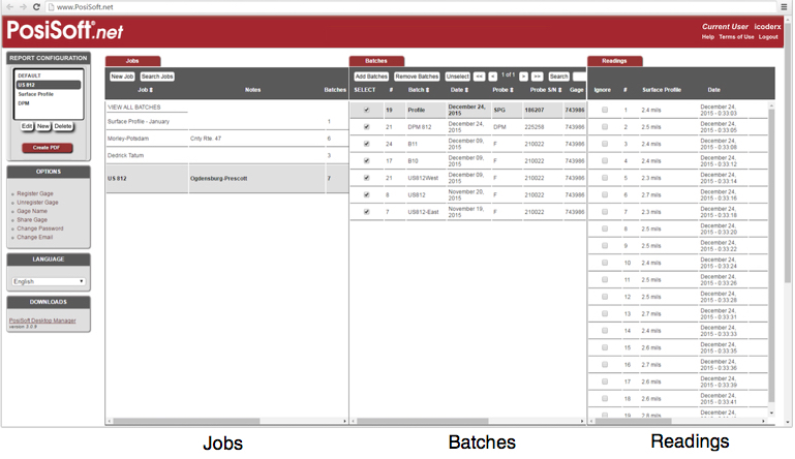
PosiSoft.net is a web-based application offering secure centralized management of PosiTector and PosiTest AT-A readings. Synchronize measurement data from your instrument and access it from anywhere in the world.

Features
  • Simple, intuitive user interface
  • Synchronize measurement data from your instrument to PosiSoft.net
  • Synchronize measurement data including readings, notes and pictures with PosiSoft Desktop and PosiTector App
  • Access your data from any web-connected device
  • Securely store measurement data in the cloud and share with authorized users
PosiSoft.net's simple interface displays your jobs, batches and readings

PosiSoft USB

All PosiTector instruments feature a built-in PosiSoft USB Drive which provides a simple interface to retrieve data in a manner similar to USB flash drives, cameras, or digital audio players.
Simple gauge interface to retrieve data in a manner similar to USB flash drives, cameras, or digital audio players. No software to install or internet connection required.
Any computer can view and download measurements (batches) stored in memory by navigating a virtual drive labeled "PosiTector" using the included USB cable.

Features

  • View and print readings and graphs using universal PC/Mac web browsers or file explorers
  • Formatted HTML report - Sample Report
  • Measurement data is stored in comma-separated text files which can easily be imported into supporting applications such as spreadsheets and databases
  • Simple file management - Copy and paste measurement data from the PosiTector to a local folder on your computer, network folder or a cloud drive
  • Access stored screen captures (snapshots) of the PosiTector display
simple interface to retrieve data like USB flash drives
easily import comma-separated text files into supporting applications

Comma separated text files
Measurement data is stored in comma-separated text files (.txt) which can easily be imported into supporting applications such as spreadsheets and databases. The text files are automatically generated and are available by simply plugging in the USB cable to any computer (Mac/PC/Unix).
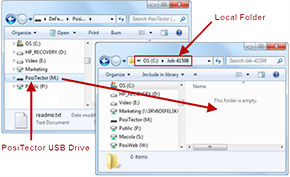
Easily move files from the PosiTector USB Drive to your Local Folder

Simple file management
Copy and paste measurement data from the PosiTector to a local folder on your computer, network folder or a cloud drive.

Find stored screen captures easily in the screen_capture folder

Access stored screen captures
PosiTector users can capture and save an image copy of the current gauge display by simultaneously pressing both the (-) and (+) buttons. The last 10 screen captures are stored in memory and can be accessed within the PosiSoft USB Drive.

Ask a question about Rental - DeFelsko 200B1-E PosiTector 200 B1 Standard Coating Thickness Gage

Customer Reviews for the DeFelsko 200B1-E-RENTAL

More DeFelsko Products